Songplanner
Free tool
Mark a line of your song
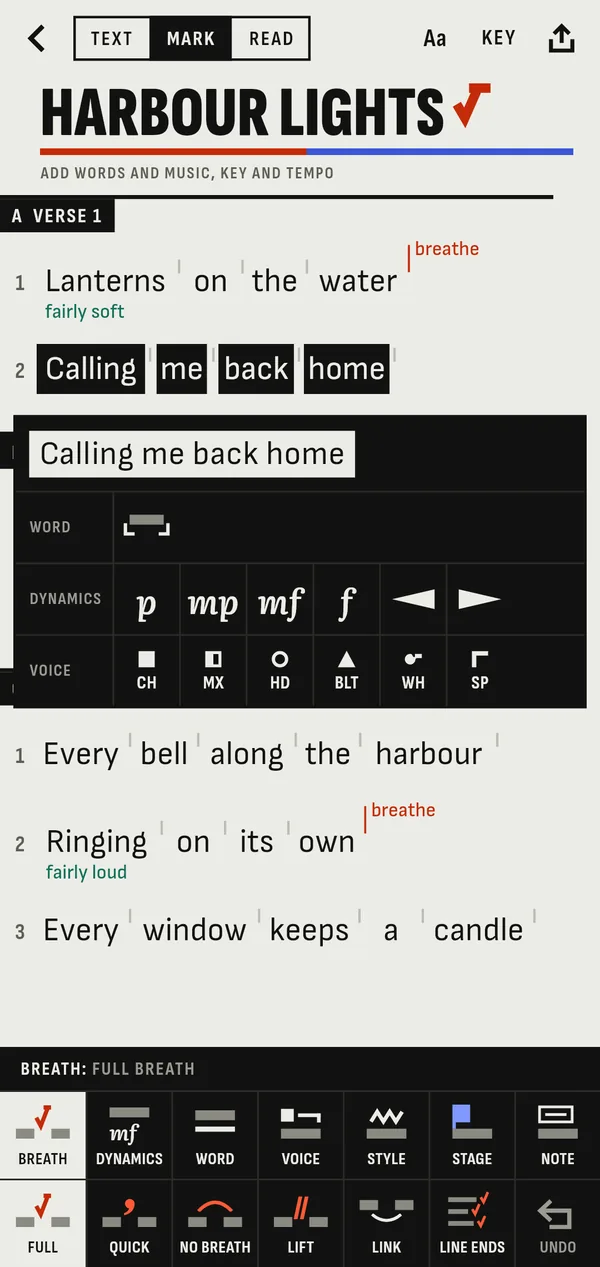
Mark where you breathe and how loud you sing, right on the words, drawn the way Songplanner prints them on a sheet.
Runs only in this page. Nothing is uploaded, saved or tracked.
Tap a gap between two words to add a breath.
How to use it
- Pick a lineChoose a line from a public domain song, or type a line of your own.
- Tap the gapsTap the gap after a word for a breath. Tap it again for a quick breath, and a third time to clear it.
- Mark a wordTap a word, then Louder, Softer or Stress. Tap the same button again to take the mark off.
- Signs or wordsSwitch how the marks look. Someone who does not read music signs can follow the words.
Then, in the app
Every mark, the whole song, the teleprompter and the PDF
This page shows three marks on one line. Songplanner marks the whole lyric, then lets you sing it and share it.
- All seven groupsBreath, dynamics, word, voice, style, stage and notes.
- A teleprompterSing scrolls the marked lyric in time with your own track or a linked video, or to the song's length.
- One clean sheetPrint it or share it as a PDF. Anyone can read it without the app.
Android: not out yet
Free. No account.