 Songplanner
Should you sing with a teleprompter, and how do you set one up?
Updated 28 November 2026
A teleprompter helps when losing the words would cost you more than a glance down: a long set, a new song, a cover you sing twice a year, a last-minute change to the set list. It gets in the way when you start reading instead of singing. Your eyes drop, your face turns to the screen, and the audience can feel it.
So set it up for glances, not for reading. Put the screen in front of you and close to your eye line, near enough that you can read the line after next without leaning in, with the type as large as the screen allows and the scroll tied to the music. Then learn the song anyway, and let the prompter cover only what you might forget.
Plenty of professionals use one
Lyric screens on stage are not just for beginners. Gary Graff, writing in Ultimate Classic Rock in 2023, quotes a sound mixer who calls teleprompter use "extremely prevalent", mostly among singers, and adds: "They're still playing live, and mostly from memory. It's just a very useful aid." A production manager in the same piece asks, "Don't symphony musicians get to use a music stand?" The same article describes Bruce Springsteen's prompters being used to change songs on the fly and take requests.
When it helps
- A long set or a big repertoire, where any song might come up.
- Changes on the night: a swapped song, a request, a verse you decide to add.
- Songs that are not settled yet, or covers you rarely sing.
- Many verses that look alike. Folk ballads and hymns are the classic trap: "Amazing Grace" has six verses, and their first lines are easy to swap.
- A safety net for nerves. Roger Chaffin and colleagues, writing on performing from memory, point out that memory slips are inevitable over enough performances, and that experienced performers recover by jumping to the next point they know. A prompter is that next point, on a screen.
When it gets in the way
- Eye contact. A 2012 piece in No Depression found it "a bit distracting" to watch a singer flip pages and eye her book while singing, and noted that if lapses keep happening through a night, it "may come off as an act not being prepared or focused".
- A low eyeline. Joseph Cottle, writing for Church Production about stage displays for worship singers, warns that if singers have to look down to the front row to see their lyrics, the awkward eyeline becomes noticeable.
- Auditions, exams and most competitions. They expect you to sing from memory.
- Gear that can fail. A flat battery or a dropped holder leaves you with nothing. Keep a printed copy in reach on a long night.
The test is simple. If the audience could describe what you were looking at, you were reading. If they only saw you singing, the prompter did its job.
How to set one up
The stand
Put a phone or tablet in a holder on a mic stand or a music stand, in front of you and just below eye level. A small glance down then keeps your face toward the room. Avoid the floor, where you have to drop your whole head, and avoid putting it off to one side, where you have to turn. Check it under the real stage lights before the show; glare on a glossy screen is easy to miss in daylight.
The distance
Autocue, a maker of professional prompters, gives a rule of thumb: stand one foot away for every inch of screen. Treat that as a far limit rather than a target. A 6.5-inch phone tops out at roughly 2 metres, a 10-inch tablet at about 3. With a phone, closer is usually easier.
To check, stand where you will sing and try to read the line two below the current one without leaning in. If you can't, move the screen closer or make the text bigger.
The text size
Go as large as you can while a line still fits on the screen in one or two rows. Autocue suggests a bigger font for smaller screens, and leaving enough words on screen that the reader never runs out. Cottle's worship displays show the current lyric and the one coming next. For a singer that means at least the current line and the next, with the current line about a third of the way down the screen so you can see what is coming.
On a dark stage, light text on a black background is easier on the eyes and lights your face less.
Only the marks you need
A prompter is not the place for your whole lesson plan. Strip it back to what you would actually miss on stage: breaths, an entrance, a move.
The timing
There are three ways to move the words. Someone else can scroll them, as an operator does on big tours and in many churches. You can scroll them yourself, with a hand or a foot control. Or the prompter can follow the music's clock.
For the clock, you need three numbers: the length of the song, when each instrumental starts, and how long it lasts. Read them off your track in any music player. The prompter then paces the words through the sung parts and holds them through the solos. Start it on the track's first beat, rehearse with it at least twice, and fix any section where the words arrive early or late. A prompter you have never rehearsed with is one more thing to manage on stage.
Do this in Songplanner
Sing, in the free Songplanner app for Android, is a teleprompter for your marked lyric. The line you are singing sits about a third of the way down in portrait, with its breaths, dynamics and moves around it.
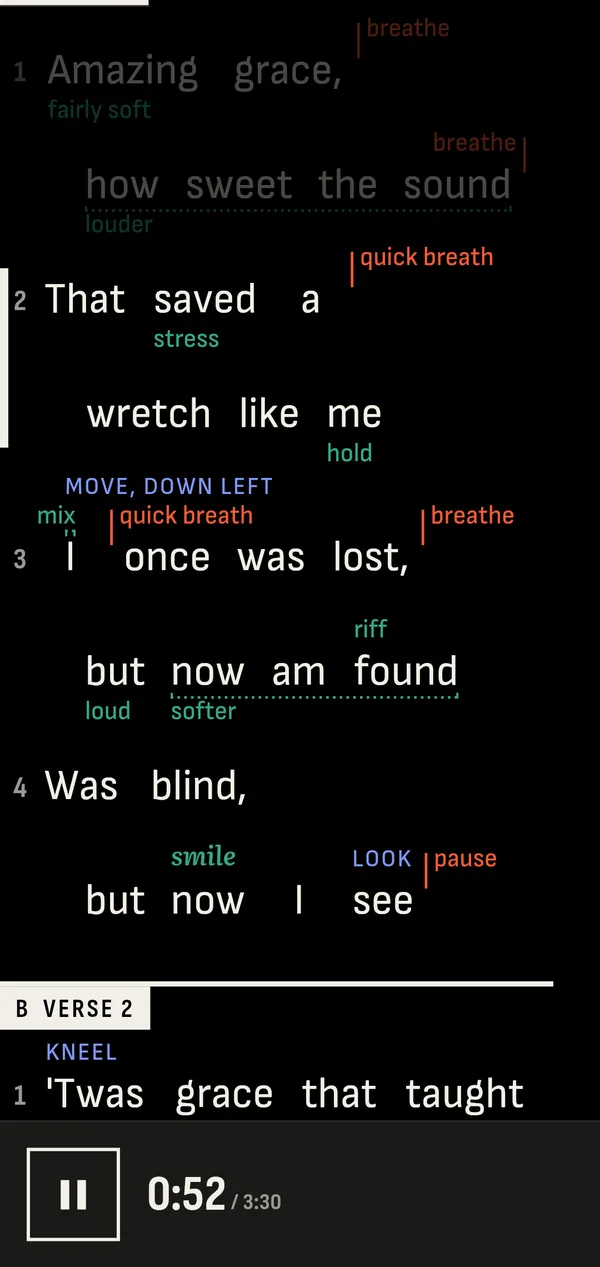
- Music. Sing over your own backing track, an audio file on your phone, and the words follow its time. Or link a YouTube video, which plays in YouTube's own player. Or set the song's length and press Start when the music starts.
- Instrumentals. Give each one its start time and length, and the words wait it out, then carry on.
- Text size. Sing has its own size, larger than Read's. Pinch to change it, separately for portrait and landscape.
- On stage. The screen stays awake while you sing, and a tap anywhere pauses.
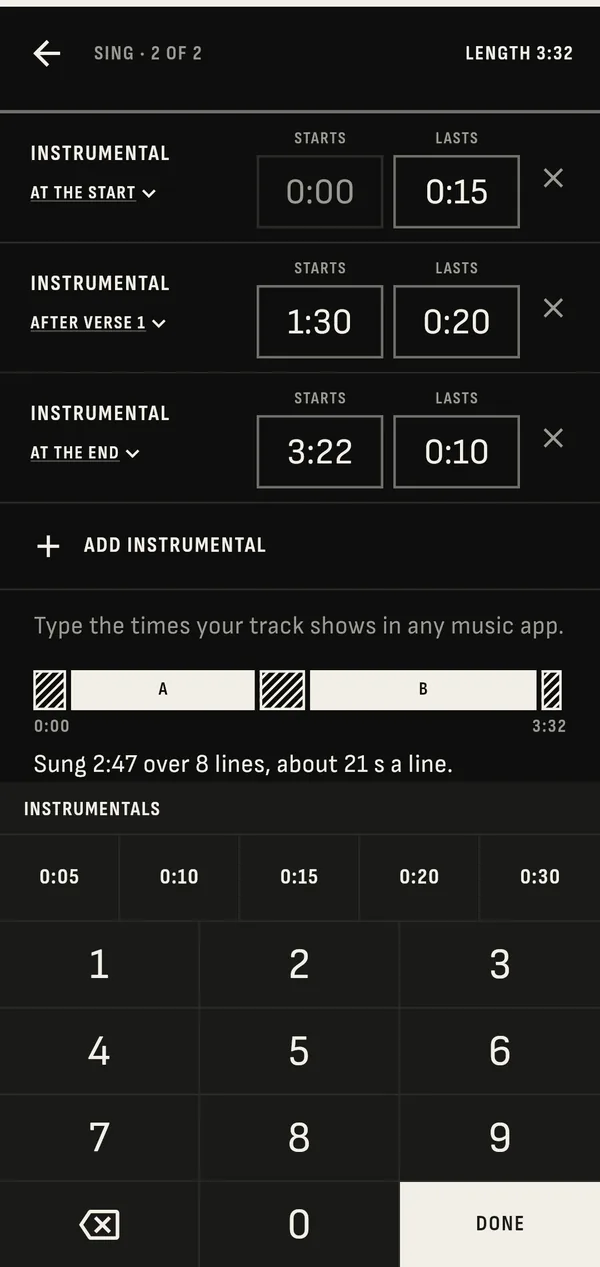
It does not listen to your voice. Between the times you give it, the words move at an even pace, so the timing is only as good as the numbers you type. No app yet? The site's free lyrics teleprompter scrolls a pasted lyric to a length you set, in your browser.
Free. No account.
Questions people ask
Is it cheating to use a teleprompter when singing?
Plenty of professional singers use one, and one production manager compares it to an orchestra's music stand. What an audience notices is whether you are singing to them or to the screen.
How far away should a teleprompter be?
A common rule from prompter makers is one foot of distance per inch of screen, at most. For a phone, that is about 2 metres, and closer is easier.
What size text should I use on a lyrics teleprompter?
As large as you can while the current line and the next one both fit on screen. Test it from where you will stand, under the stage lights.
Can a teleprompter follow my voice?
Songplanner's does not: it keeps time with your track, the video you link, or the length you set. Live, an operator scrolling by hand is the other common way to follow a singer.
Should I use a teleprompter at an audition?
No. Auditions are a test of how well you know the song, and the panel expects it from memory.
Sources
- Gary Graff, on bands, teleprompters and backing tracks, Ultimate Classic Rock (January 2023)
- "Teleprompters for Musicians: Cheating or Helping?", No Depression (2012)
- Joseph Cottle, on confidence monitor basics, Church Production (June 2023)
- Autocue: What size of prompter do I need?
- Roger Chaffin, Topher R. Logan and Kristen T. Begosh, "Performing from memory", The Oxford Handbook of Music Psychology (2009)