 Songplanner
Free tool
Lyrics teleprompter
Paste your lyrics, set the song's length and press Start. After a 3-second count-in, the words scroll evenly to the end, in big type on a dark screen.
Runs only in this page. Your lyrics are not uploaded or saved.
Tips for singing from it
- Set the running timeFrom the first note to the last, as you perform it. The words reach the last line when the song ends.
- Start three seconds earlyThe count-in fills that time. Start your music on one, and the first line sits at the bar on the left.
- Eye levelPut the phone on a stand or a music desk, so your head stays up.
Questions
Does it follow my voice or the music?
No. It scrolls at an even speed over the length you set. Tap the screen to pause, and again to carry on.
Will my screen turn off?
Where the browser allows it, the page keeps the screen awake while the words scroll. If yours does not, a note at the top of the teleprompter says so.
Are my lyrics sent anywhere?
No. Everything happens in this page. Nothing is uploaded, and nothing is kept when you close it.
Then, in the app
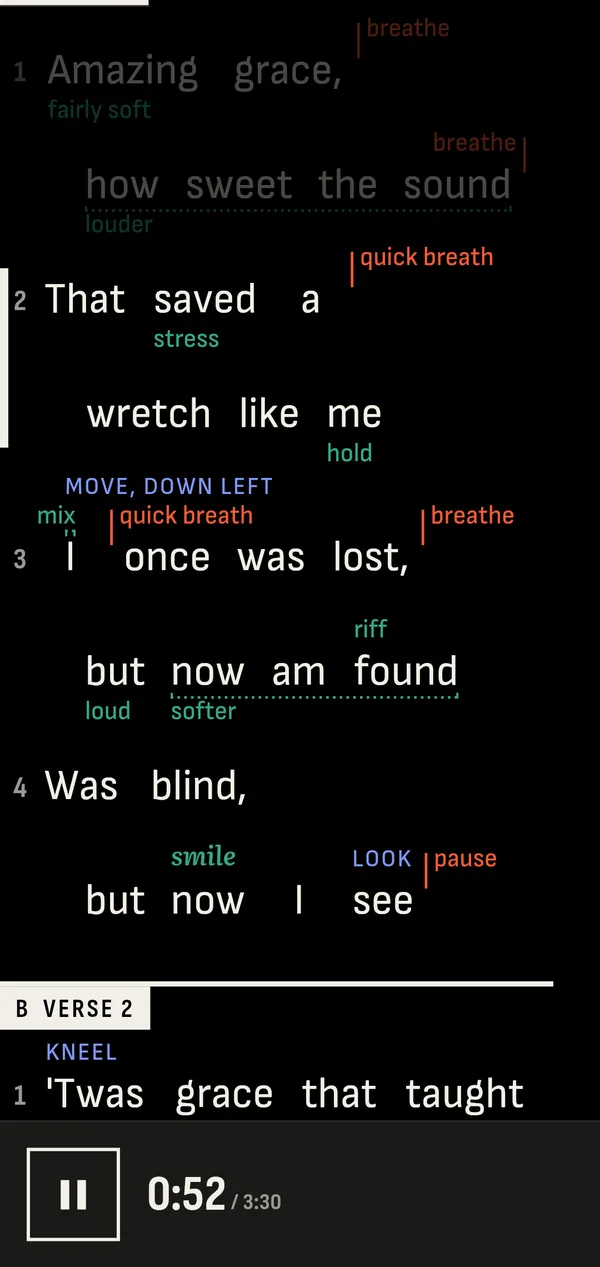
Your marks on the words, and the words wait out the solo
Sing in Songplanner does what this page does, with more of the song in it.
- Your marks on the wordsEvery breath, dynamic and move stays beside its word while it scrolls.
- Your own track or a videoSing over a backing track on your phone, or a YouTube video you link, which plays in YouTube's own player.
- Instrumentals that waitGive each instrumental its start time and the words hold until you sing again.
Android: not out yet
Free. No account.
Next
This browser may let the screen dim.
0:00/ 0:00